

Get started as a Nortrip host</trp-post-container
Get started as a Nortrip host
To get started as a Nortrip host, there are 3 key things you need to do:
- Create a Nortrip account
- Download and log in to the Nortrip app
- Get to know your host profile and booking calendar
Here is more information about these three points.
1. Create a Nortrip account
After we have created a host profile for you, we will send you an email inviting you to create a Nortrip account. Click the "Join now" button in the email and follow the steps here to create an account.
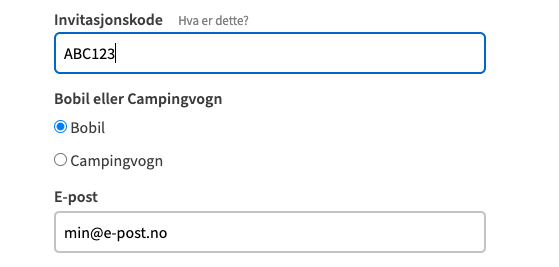
The form will be pre-filled with an e-mail address and an invitation code. As a host, you must tick the box for Motorhome, and in the field for Car number you can write anything you like.
2. Download the Nortrip app
Once you have created a Nortrip account, you need to download the Nortrip app from App Store or Google Play.
3. Get to know your host profile and your booking calendar
After logging into the Nortrip app, you will see an overview of all Nortrip hosts. You are automatically the administrator of your own host profile, so find your map pin in the map and click into your host profile.
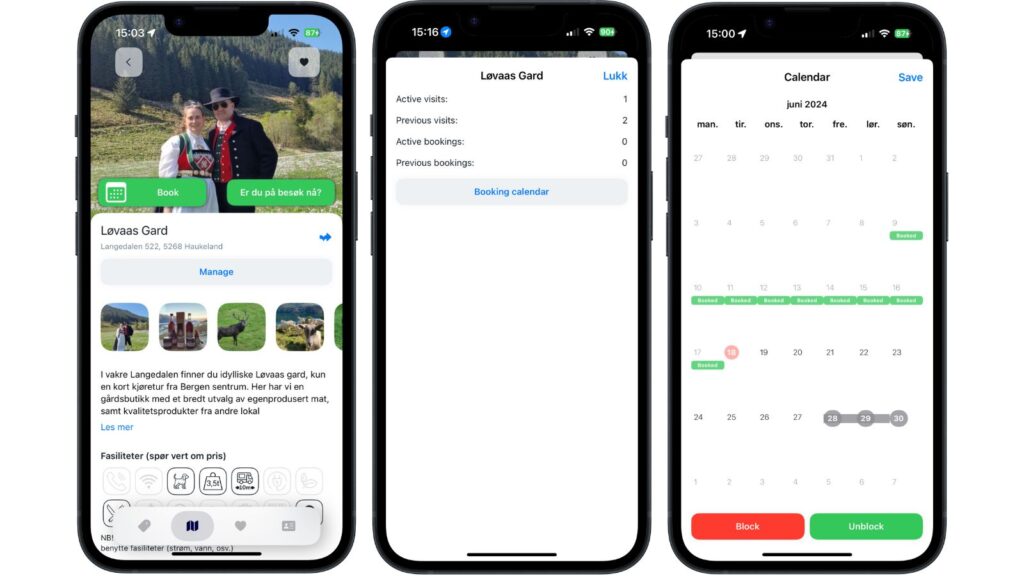
Inside your host profile, you can manage your booking calendar as follows:
1. Tap on "Manage"-button that is directly above the image row.
If you don't see the "Manage" button, we need to link your account to your host profile. Contact us by email and we'll sort it out.
2. In the calendar view, you will see previous and upcoming bookings. Swipe sideways to change the month.
3. In order to Block one date, click on the date and then "Close".
4. In order to Block a period, tap the first date and then the last date in the period and then tap "Close".
5. In order to Unblocking a blockFollow the same procedure, but press "Open" instead.
The dates that are blocked apply to the day of arrival. For example, if you don't want overnight stays from Sunday to Monday, only Sunday should be blocked.
IMPORTANT: Press Store to save your changes!














 English (UK)
  Norsk bokmål
  Deutsch
  Français
  Nederlands
  Svenska
  Suomi
Suomi